Models & providers
EditVolt runs AI two ways: on your machine, with models that ship with the product, or bring-your-own-model against providers you already pay for. Cloud requests go directly from your machine to the provider — EditVolt runs no proxy in between and adds no markup.
Everything here lives under EditVolt Settings → AI Models.
On-device models
Chat and the agent work with no API key and no account — signing in is optional and unrelated to AI access. On first run EditVolt offers a local chat model sized for your hardware; Choose model shows the full catalogue with what fits your RAM and disk.
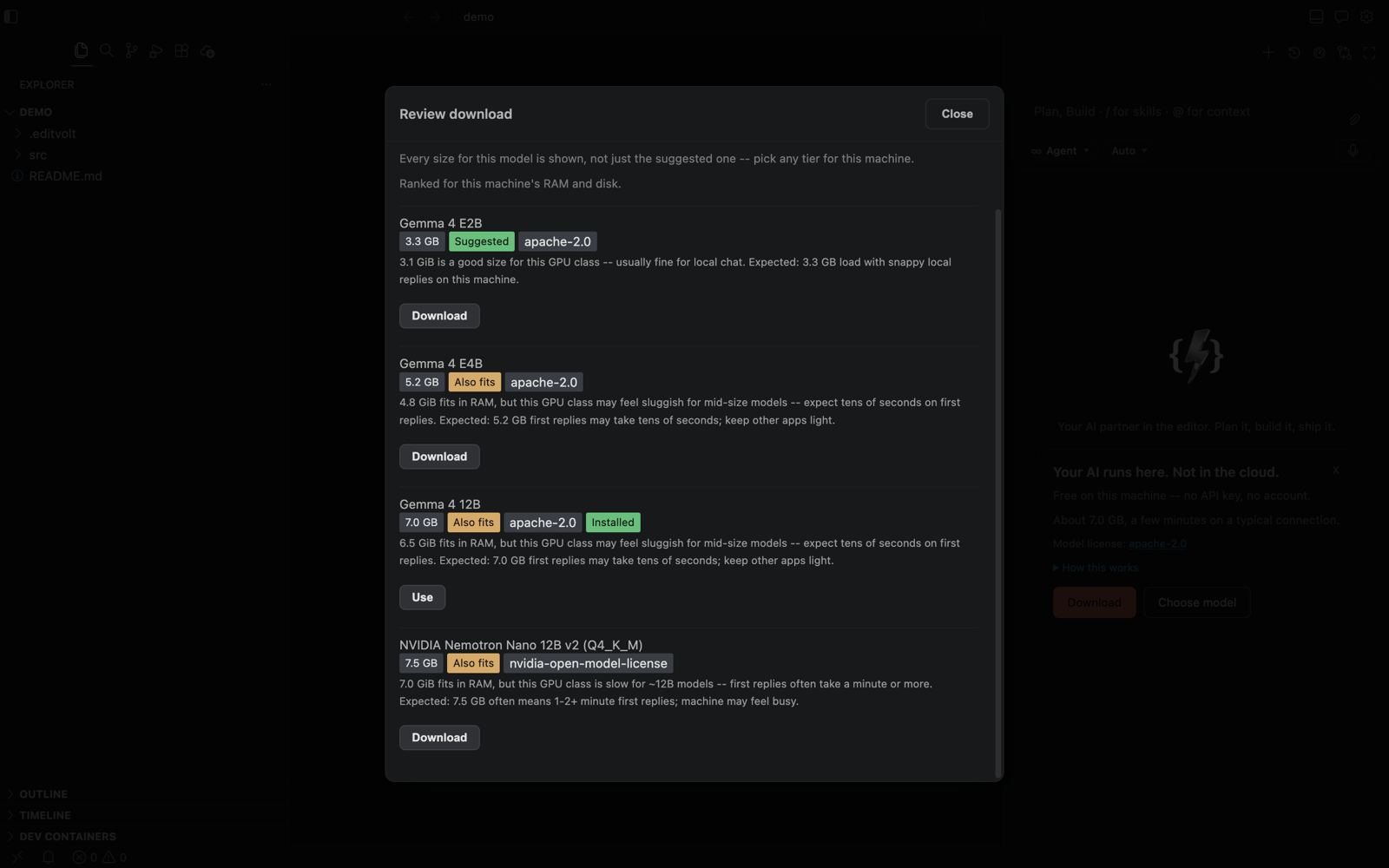
| Model | Size | Notes |
|---|---|---|
| Gemma 4 E2B | 3.3 GB | Snappy on most machines |
| Gemma 4 E4B | 5.2 GB | Middle tier |
| Gemma 4 12B | 7.0 GB | Best quality; the default product.models.chatTier |
| NVIDIA Nemotron Nano 12B v2 | 7.5 GB | Alternative 12B lane |
| Setting | Default | Description |
|---|---|---|
product.models.chatTier | 12b | auto, e2b, e4b, 12b, off |
product.models.localTier | auto | Inline-completion model tier |
product.models.baseUrl | https://huggingface.co | Where models download from; repoint to an internal mirror. HTTPS only, SHA-256 verified |
product.models.allowedLicenses | — | Licenses you accept for downloaded models |
product.models.path | (empty) | Storage folder; defaults under ~/.editvolt/models |
Downloads require explicit consent and can be paused from the Assistant panel; the status bar shows progress and readiness.
Cloud providers
| Provider | Connection |
|---|---|
| Anthropic Claude | API key — or bridge your existing Claude Code CLI sign-in with one click |
| Google Gemini | AI Studio API key |
| OpenAI-compatible | Any base URL + key: OpenAI, OpenRouter, Azure OpenAI, vLLM, LM Studio, Together… |
| Hugging Face | Remote inference or local (product.provider.huggingface.routing: fastest, cheapest, none) |
| Ollama | Local daemon at localhost:11434 — no key |
Model lists are fetched live from each provider (cached for product.provider.modelListTtlMs, one hour by default), so new models appear in the picker automatically.
The Claude Code CLI bridge runs the CLI as a warm session; product.claudeCode.permissionMode (default acceptEdits) controls how much it may do without asking.
API keys
Keys are stored in your operating system keychain — never in plaintext files — and read only for the duration of each request.
"Connected" in the Models section means verified: EditVolt validates the credential rather than assuming it works.
Routing
Pick a default provider (product.provider.default) and optionally enable smart routing:
| Setting | Default | Description |
|---|---|---|
product.routing.autoFastLane | false | Send heavy turns to a fast cloud model while quick chat stays local |
product.routing.fastLaneProvider | claude | Which provider serves the fast lane |
product.routing.heavyModel | (empty) | Model for heavy surfaces, as modelId or providerId/modelId |
product.routing.heavySurfaces | chat, refine, terminalCmdK, reviewChanges | Which surfaces count as heavy |
product.provider.autoFailover | false | Fall back to another provider on failure |
EditVolt never silently substitutes providers: if the one you chose is unavailable you get an honest error, not a quiet reroute. Routing never overrides a model you picked yourself, and cloud entries are ignored entirely under strict privacy.
:::tip Fully local setup
The on-device models above already give you a zero-key setup. To also forbid any cloud call, set product.privacy.strict: true — see Privacy controls.
:::